

Ivory is home for your database clusters — deploy, watch and fix them from one place, be it your browser, your phone or your AI agent. Open source, self-hosted, one Docker container and nothing to install on your hosts.
Latest release
Why Ivory
Why Ivory?
Nothing to install
Ivory reaches your machines over plain SSH and talks to each database in its own protocol. No agent beside every node, no Kubernetes, no Ansible, no cloud account — one Docker container and you are done.
One workflow, every engine
PostgreSQL, etcd, Redis, ClickHouse, MongoDB and ZooKeeper look and behave the same: the same health view, the same switchover button, the same console. Learn it once, use it everywhere.
Fix it from anywhere
A UI that works on your phone for the 3 a.m. page, and a built-in MCP server so your AI agent can dig into a cluster with you — under exactly the permissions you have.
Supported
Supported databases and clusters
PostgreSQL + Patroni
High-availability cluster with Patroni
StablePostgreSQL
Primary and standby replication
Betaetcd
Raft cluster
BetaRedis
Master and replica replication
BetaClickHouse
Replicated cluster
BetaMongoDB
Replica set
BetaZooKeeper
Ensemble
PluginYours next?
Every engine is a plugin — add the one you run.
Features
Everything a cluster needs, in one place
Deploy over plain SSH
Pick a template, point it at your machines and press Deploy. A high-availability cluster comes up — no Kubernetes, Ansible or agent.
Learn more →Health at a glance
Roles, replication lag, pending restarts and warnings for every node — including the one that quietly left the cluster.
Learn more →HA operations in a click
Switchover, failover, reinitialise, restart, reload and pause — scheduled for later where the cluster supports it.
Learn more →The machine behind each node
Containers, CPU, memory, network, processes and any log file on the host — read and controlled over SSH.
Learn more →Query console and tools
Saved diagnostic queries, a console for every engine, and maintenance tools like pgcompacttable with live output.
Learn more →Teams and permissions
Basic, LDAP or OIDC sign-in, and a permission for every action — enforced the same in the UI and for AI agents.
Learn more →AI-ready
Just ask your cluster
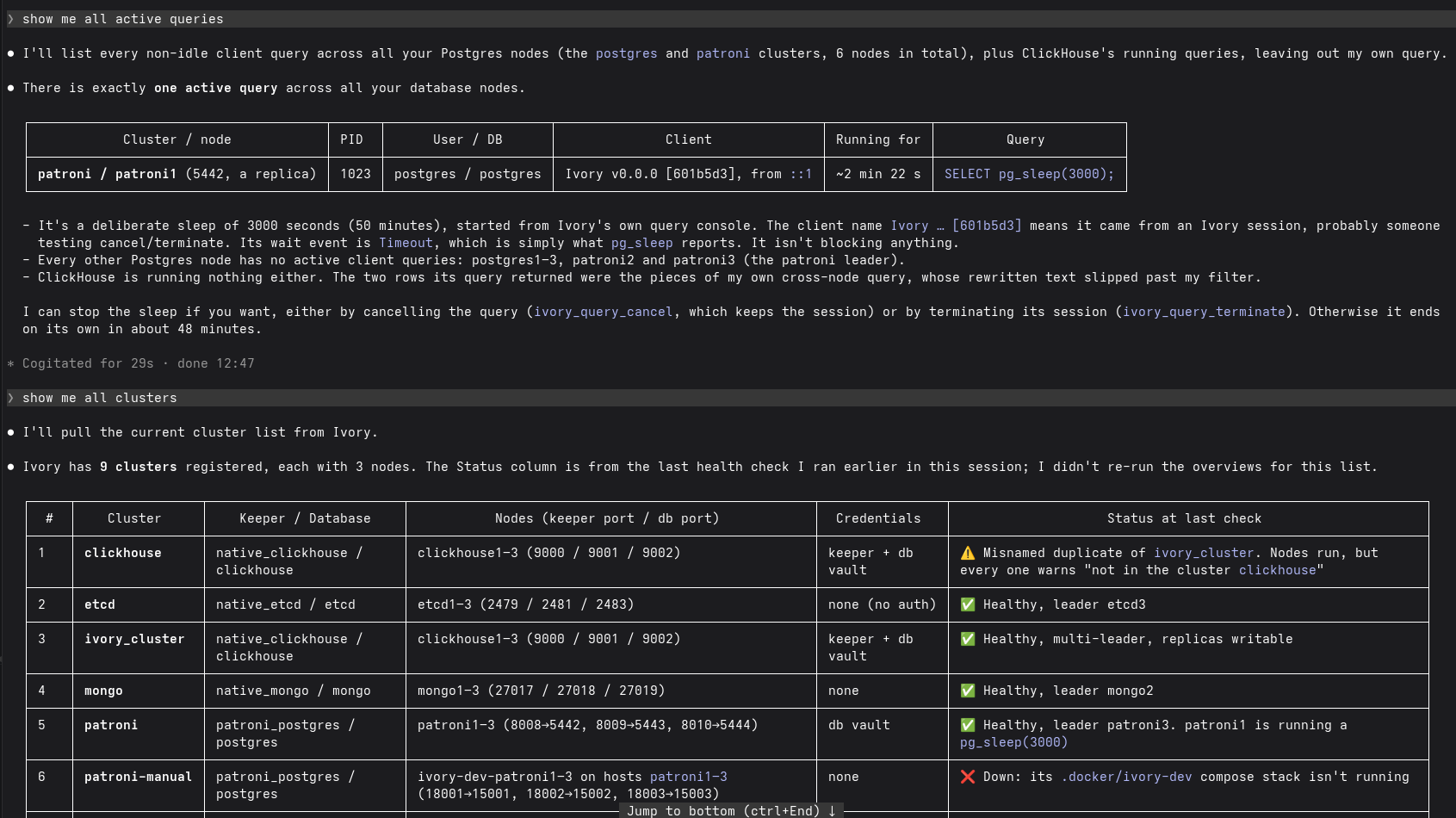
Ivory has a built-in MCP server. Connect Claude, Cursor, Codex or any MCP client and talk to your clusters in plain words — the agent reads their health, runs diagnostics and acts only where your own permissions allow.
Connect an agent →- Why is replica 2 lagging?
- What is blocking my queries?
- Switch the leader to node 3.
Get started
Up and running in a minute
docker run -p 80:80 --restart always veegres/ivory- 01
Run the container
One image, no external dependencies — from Docker Hub or the GitHub Container registry.
- 02
Open the setup wizard
Go to http://localhost, choose how people sign in and set the secret key.
- 03
Add a cluster
Type its node addresses, let Ivory detect the rest from one, or deploy a new one.
Articles
Read about Ivory

Ivory v2.1.0 — Your Database Clusters Can Now Talk to AI
A built-in MCP server, one deploy flow for clusters and nodes, smarter sessions and health checks you can trust a little more.

Ivory v2.0.0 — Beyond Postgres
From a Postgres and Patroni tool to a pluggable architecture: Keepers, etcd, Redis, ClickHouse, MongoDB and ZooKeeper, cluster deployment and user management.

Ivory 1.4.0
LDAP and OIDC/SSO sign-in, a full permissions system, cluster detection moved to the backend, backups and query improvements.
Community
Get involved
⭐ Star on GitHub
It takes one click, helps other people find Ivory, and keeps its author building it.
Star the repository →🧩 Add your database
Every engine is a self-contained plugin. The repository ships an AI agent that writes one for your engine by the project's checklist.
Read the contributing guide →❤️ Support the project
Ivory is free, open source and built in spare time. Sponsorship funds new database plugins and features.
Become a sponsor →