
MCP server
Ivory exposes its features to Model Context Protocol clients, so an
AI agent can read a cluster's health and operate it with the same permissions the signed-in user has.
The endpoint speaks streamable HTTP and lives at /api/mcp on the same address and port as the web UI.
It is the troubleshooting surface that benefits most: everything Ivory already knows about a cluster — node roles, replication lag, pending restarts, its own drift warnings, VM metrics, container logs and the saved diagnostic queries — becomes readable in one conversation instead of one screen at a time.
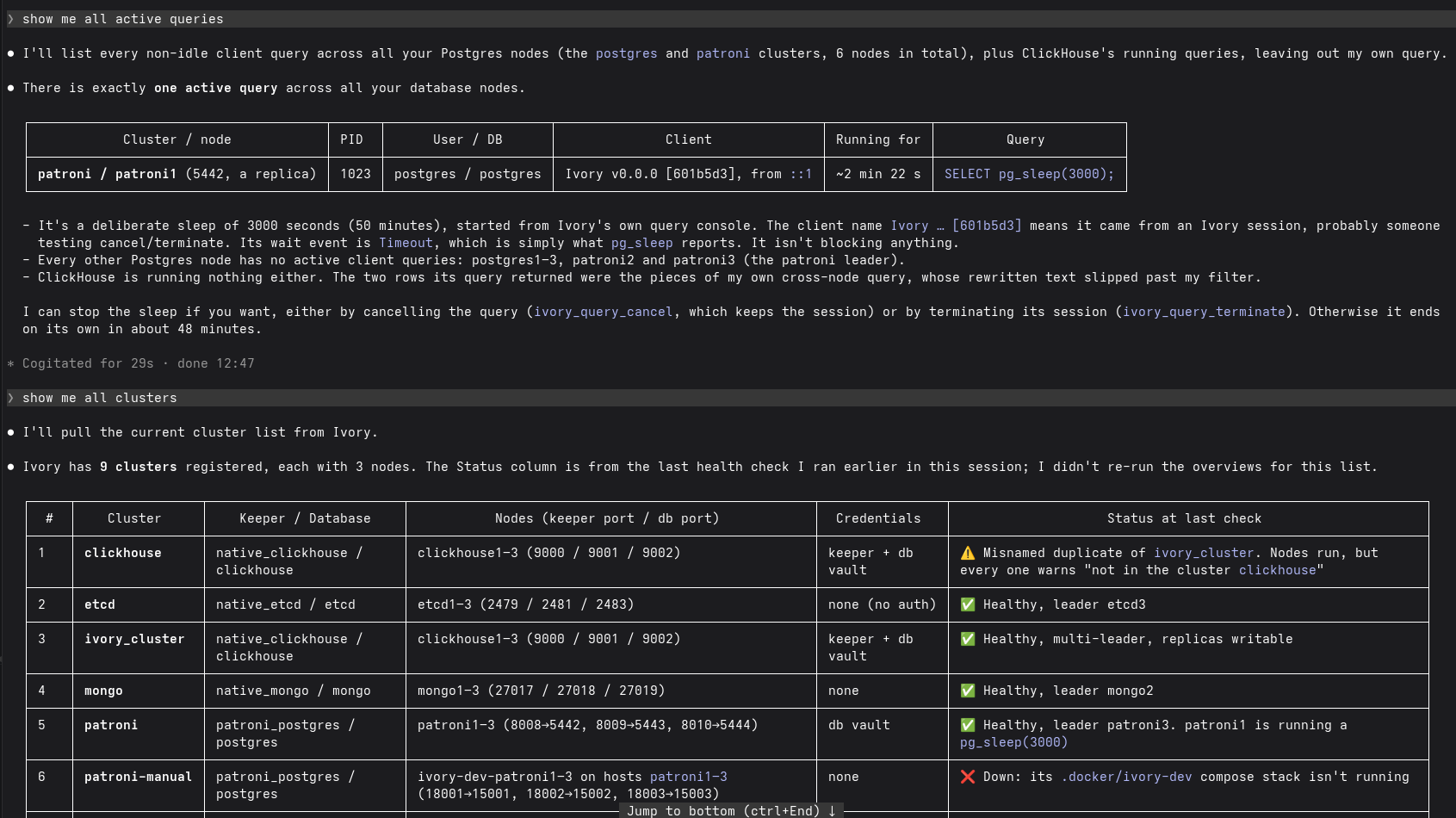
Asked in plain words, the agent finds a long-running pg_sleep on one Patroni replica across six Postgres
nodes, offers ivory_query_cancel/ivory_query_terminate to stop it, and then summarises every registered
cluster — keeper, ports, credentials and health — including one that is down and one misnamed duplicate.
Connecting a client
Authentication is a bearer token: Ivory's ordinary session JWT, sent in the Authorization header.
The quickest way is the web UI. Open Settings → Integrations → MCP Server: it shows the endpoint
for this install, generates a token on request for the lifetime you pick — 1 hour, 6 hours, 1 day,
15 days or 30 days — and gives you a ready-to-copy config with both already
filled in — pick your client from the list. It covers Claude Code (the claude mcp add command and
.mcp.json), Cursor, VS Code, Codex, Antigravity, IntelliJ IDEA and Claude Desktop, plus a plain
transport/url/header summary for anything else that speaks streamable HTTP.
Before you generate a token the config shows {{ivory_token}}, highlighted exactly the way an unanswered
variable is in a deployment preview — one glance says which part is not real yet. Generate a token and it
is written in. Where a client reads the token out of an environment variable rather than inline — Codex,
and the mcp-remote bridge the two desktop clients use — the screen offers the matching
export IVORY_TOKEN=… to copy beside the config.
The shapes are not interchangeable, which is why each client gets its own rather than one block with the hostname swapped:
To do it by hand instead:
-
Mint a token. Signed in to the UI, ask for one for the session you already hold, saying how long it should live in seconds — anything up to 30 days (
2592000), never unlimited:Or take one out of a fresh login, which always lasts one hour:
POST /api/auth/tokenneeds no permission — it is the account you are already signed in as — and it re-checks that the account is still registered, so a user deleted since they signed in cannot keep minting. It writes no cookie, so generating a token for an agent leaves your browser session alone.A minted token says it came from a session. Its
frmclaim readssessionrather than thebasic/ldap/oidca login would put there, so it is told apart from the token that asked for it. It is never offered as a way of signing in — a login screen lists the configured providers, and this is not one of them — and because no user is registered for it, a session token cannot mint another one. Only a login can, which is what keeps the lifetime you chose from being extended forever. -
Point a client at the endpoint with that token. For Claude Code:
Or, in
.mcp.json:
The token lives exactly as long as you chose, and cannot be revoked. Ivory stores no tokens, so once one is issued it stays valid until it expires — deleting the user, changing their password or signing out does not end it early. Pick the shortest lifetime the agent needs, and treat a 30-day token like a password that cannot be changed for a month.
Nothing refreshes it either: a token sent in the
Authorizationheader is never renewed, so when it expires the agent starts failing with401. Replacing it is a click in Settings → Integrations → MCP Server — generate another and update the client — but an agent cannot do it for itself: the token it holds came from a session and will not mint a successor.
When Ivory runs with authentication switched off, no token is needed and every tool is available — the same as the REST API, which is already unauthenticated in that mode.
Permissions
An MCP client sees only the tools the user holds permission for. Each tool reuses the permission of
the REST route it mirrors, so nothing new has to be granted: a user who may view a cluster overview in
the UI gets ivory_cluster_overview, and a user who may not run a switchover never sees
ivory_keeper_switchover at all.
The tool list is recomputed on every request, so revoking a permission takes effect on the agent's next call without reconnecting.
Tools are also annotated for the client's approval prompt: read-only tools are marked as such, and the ones that can break something are marked destructive.
Tools
Each tool takes the same arguments as the REST route it mirrors. A tool lives in the feature it
belongs to (cluster_router_mcp.go, node_router_mcp.go, …) and speaks that feature's own request
shape, so there is one contract behind two transports. Only cluster tools are addressed by cluster name; node and
query tools are addressed the way the web UI addresses them — by host, port and vault id.
So the usual flow is two steps, exactly as the UI does it:
A tool requires an argument only where the REST request does (binding:"required"); everything else
defaults the way an omitted JSON field does, and the feature's own validation names whatever it still
needs. ivory_cluster_overview is the exception worth knowing: it resolves every node of a cluster
itself, which is why it is one call and the fastest route to a diagnosis.
Clusters
Keeper
Keeper tools take KeeperOneRequest — the connection (host, port), the cluster name, the plugin, the
vault id, and a free-form body passed straight to the keeper, the same body the REST route forwards:
leader and candidate are the keeper's own member keys, which ivory_cluster_overview reports as
each node's keeper.key. Patroni does not accept a host there. Send a switchover to the current leader.
Node system and containers
System and container tools take a PlatformVaultConnection (host, port, vaultId, platform) — the
ssh port and the cluster's vaults.sshKeyId from ivory_cluster_get. Metrics are counters, not
percentages: call twice and take the difference. Log tools return a bounded tail (100 lines unless tail
says otherwise) rather than a live stream, and report a failure to read the log in notes beside the
lines, because the underlying stream pushes its problems as messages rather than returning an error.
Database
Deployment templates
Ivory itself
ivory_app_info reports the version, configuration state and which authentication methods are accepted.
It mirrors the unauthenticated /info route and needs no permission.
What this lets an agent do
Granting manage.* permissions to a token an agent holds means the agent can take a production cluster
down. That is the same power the user already has in the UI, and Ivory gates it the same way — but a UI
click and a tool call are not equally deliberate, so it is worth being explicit:
ivory_keeper_failoverforces a leader change without the checks a switchover makes, and can lose committed data if the candidate is behind.ivory_keeper_reinitializewipes a member's data directory and re-clones it from the leader.ivory_keeper_pauseswitches off automatic failover and nothing reminds you later.ivory_container_downstops and removes a container, including the logs that would have explained a failure.ivory_container_execandivory_container_uprun commands you supply on the host or inside a container. There is no allow-list — that is what a deployment is.ivory_query_consoleruns SQL verbatim. Ivory does not classify statements anywhere, soDROPis as reachable asSELECT.
If an agent should only diagnose, give its user view.* permissions and nothing else: the mutating tools
then do not appear in its tool list at all. Most MCP clients also prompt before each call and honour the
destructive annotation Ivory sets.
Not exposed
Some of Ivory's REST surface has deliberately no tool:
- Erase, free and secret rotation — irreversible, whole-install operations with no diagnostic value.
- Backup export and import — binary file transport, and the export carries secrets.
- Vault, certificate, user and permission administration — these move credentials through tool arguments, and letting an agent edit permissions would let it widen its own access.
A deploy names its credentials as vault ids, never as inline passwords, for the same reason: no
secret passes through the agent's context. ivory_cluster_deploy therefore omits the inline
sshUser/sshPass/dbUser/dbPass fields the REST route accepts — create the vault entries in the UI
first and name them in options.vaults.
How it is built
MCP is a second engine beside the http one, not a feature of its own:
core/engine/engine_mcp.gois the MCP engine, the sibling ofengine_http.go. It declares every tool next to the permission that gates it and the feature router that serves it — the same thing the route table does — and it builds the transport.main.gocreates it and hands it to the http engine, which mounts it at/api/mcp.- Each feature keeps its own MCP implementation in its own package, in
<feature>_router_mcp.go, beside the http router it already has:cluster_router_mcp.go,node_router_mcp.go(plusnode_router_mcp_keeper.go/node_router_mcp_platform.go),query_router_mcp.go,deployment_router_mcp.go,tag_router_mcp.go,management_router_mcp.go. Both transports share the request and response types, namedRouter***Request/Router***Response. - Only
clusterresolves a cluster into connections, because onlyclusterimportsnodeandquery. That is why node and query tools are addressed directly.
Notes
- The endpoint is stateless: every request carries its own session, and
Mcp-Session-Idis not used. - Requests are capped at 4 MB.
- Cross-origin browser requests are rejected. Non-browser MCP clients send no
Originand are unaffected. - Behind a reverse-proxy sub-path, the endpoint moves with it:
IVORY_URL_PATH=/ivoryputs it at/ivory/api/mcp.